- Most of the time a slow WordPress site is caused by cheap hosting, page-builder bloat, unoptimised images, too many plugins, or no caching, not WordPress itself.
- Fix it yourself only if there is one obvious cause and you are comfortable editing WordPress. Otherwise hire a speed specialist.
- Hire a performance specialist, not a general developer, because speed is a distinct skill measured in Core Web Vitals.
- A straightforward speed fix often costs a few hundred to a couple of thousand dollars, far less than a full rebuild.
- Vet on real before-and-after PageSpeed scores, and beware anyone who promises speed without measuring first.
To fix a slow WordPress site, you usually want a performance specialist rather than a general developer, because speed is a distinct skill measured in hard numbers. Before you hire anyone, though, it helps to know what is actually slowing your site down, because the cause decides whether you need a quick tune-up or a bigger rescue.
Here is the good news most panic-searching site owners miss: WordPress itself is rarely the problem. A slow WordPress site is almost always the result of a handful of fixable issues piled on top of it. This guide walks through what makes a slow WordPress site slow, whether you should fix it yourself or hire out, who exactly to hire, and what a fair fix should cost, so you spend money on the right solution instead of guessing.
Why You Have a Slow WordPress Site
A slow WordPress site is usually caused by one or more of five things: cheap shared hosting, page-builder bloat, unoptimised images, too many plugins, and missing caching. WordPress is efficient on its own; the slowness comes from what gets piled on top of it over time.

These are the causes worth checking first, roughly in order of how often they are the culprit:
- Cheap shared hosting: hundreds of sites share one server, so yours slows down when neighbours get busy. The single most common cause.
- Page-builder bloat: Elementor, Divi, and similar builders generate heavy, nested code that loads site-wide, whether a page uses it or not.
- Unoptimised images: huge, uncompressed images are one of the biggest and easiest-to-fix drags on load time.
- Plugin bloat: every plugin adds code and requests, and overlapping or abandoned plugins quietly pile up.
- No caching: without caching, WordPress rebuilds each page from scratch on every visit, wasting time it does not need to.
Crucially, most slow sites are not suffering from one dramatic problem but from several small ones stacked together. That is why a single caching plugin rarely delivers a full recovery: it fixes one link in the chain while the others still drag. Understanding this stack is what separates a real fix from a band-aid.
Pro tip: Before changing anything, get a baseline score from Google’s free PageSpeed Insights. You cannot tell if a fix worked, or if a developer delivered, without a before-and-after number.
Once you have a sense of the likely cause, the next question is whether this is a job you can do yourself.
Fix a Slow WordPress Site Yourself, or Hire?
Fix a slow WordPress site yourself only if there is one obvious cause, you run fewer than about twenty plugins, your site is a simple brochure or blog, you are comfortable editing WordPress, and you are not losing revenue every day it stays slow. If any of those is not true, hire a specialist.

Some slow WordPress site fixes genuinely are do-it-yourself. Compressing your images, installing a reputable caching plugin, and moving to better hosting are the three fixes that resolve a large share of slow sites, and together they can improve load times significantly, with Largest Contentful Paint often the metric that moves most. If your site is small and the cause is obvious, start there.
But there is a hard limit to DIY. As performance engineers often point out, frontend tweaks cannot fix a slow backend. If your problem lives in server-side rendering, database queries, or deep plugin conflicts, no caching plugin will save you, and random changes can make things worse. That is the point where a slow WordPress site needs a specialist, who then becomes the cheaper option.
If you have decided to hire, the next question is the one that trips most people up: what kind of person do you actually need?
Who to Hire: Specialist, Generalist, or Host?
To fix a slow WordPress site properly, hire a WordPress performance specialist rather than a general developer or your hosting company’s support line. Speed optimisation is a distinct discipline, measured in Core Web Vitals, and a specialist does in hours what a generalist might spend days guessing at.
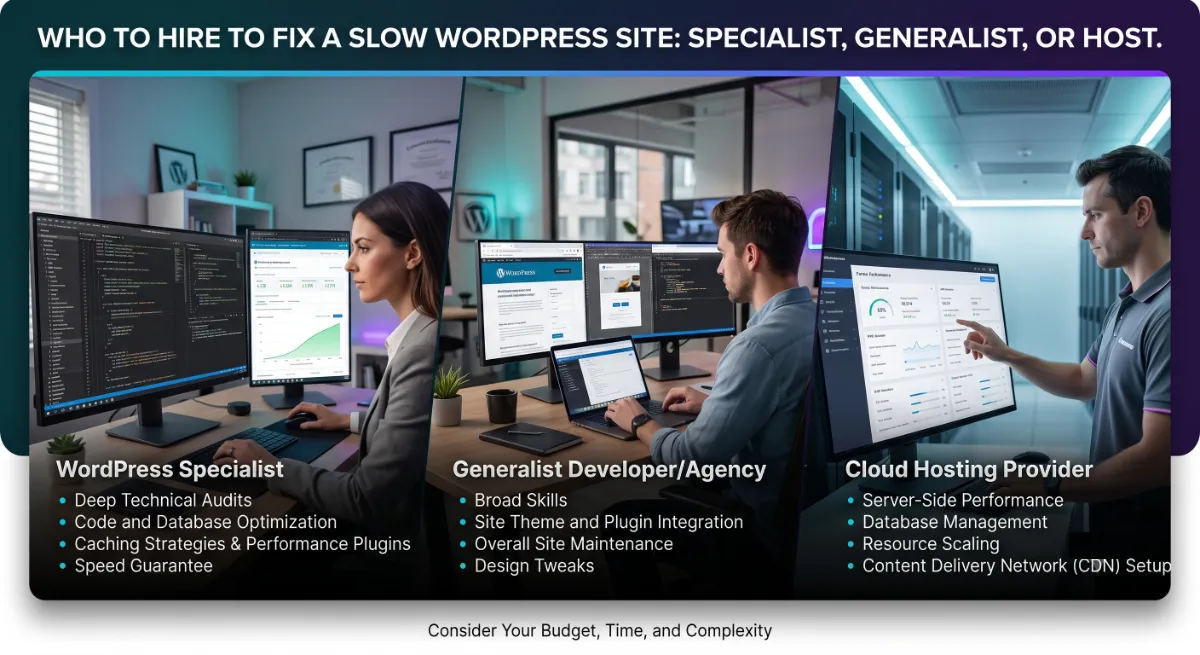
Your realistic options each have a place. Your host’s support can help if the bottleneck is genuinely the server, but they will not touch your theme, plugins, or code. A general WordPress developer can make improvements, but performance is often not their core strength, so results vary. A dedicated WordPress speed optimization specialist treats Core Web Vitals as the whole job, diagnoses the real bottleneck, and fixes the actual cause rather than the symptom.
The reason the specialism matters is measurement. A performance specialist starts with data, identifies exactly which of the five causes is hurting you, and proves the result with a before-and-after score. This is also closely tied to general vetting, so our guide on who to hire to build or fix a WordPress site is worth reading alongside this one for the broader hiring framework.
Not sure if it is your host, your plugins, or your theme?
We will run your site through Core Web Vitals and tell you the real bottleneck, and whether it needs a fix or a rebuild. Ask for a speed diagnosis.
Sometimes, though, the honest answer is that fixing is not the right call at all.
Is It a Fix or a Rebuild?
A slow WordPress site is worth fixing when the foundations are sound and the problems are fixable, such as hosting, images, caching, or a few heavy plugins. It is worth rebuilding when the slowness is baked into a bloated page-builder theme or tangled custom code that would cost more to untangle than to replace.
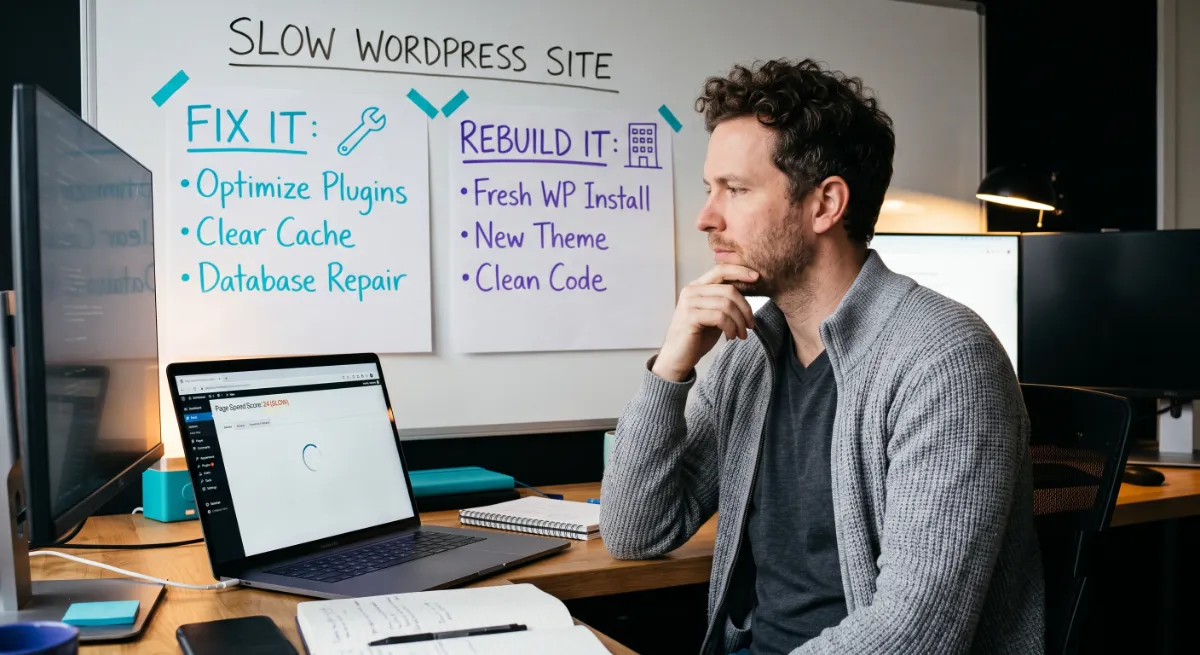
With a slow WordPress site, the deciding factor is where the slowness lives. If it comes from things layered on top of a solid site, a targeted fix is faster and far cheaper. If the site itself is built on a heavy page-builder stack propped up by twenty-plus plugins, you can optimise around the edges, but you are polishing a fundamentally slow structure. At that point, a lean, genuinely custom rebuild often costs less over time than repeatedly patching the old one.
A good specialist will tell you honestly which situation you are in, even when a rebuild is not what they would prefer to sell. If a rebuild is the right answer, our guide on finding someone to build a fast custom WordPress website covers exactly what to look for, and our custom WordPress development is built lean specifically to avoid the bloat that makes sites slow in the first place.
Pro tip: Ask the specialist to quote both options: the fix and the rebuild. An honest one will happily do this and tell you which they would choose in your shoes, and why.
Whichever path you are on, the same checks confirm whether a specific candidate can actually deliver speed.
7 Checks Before You Hire a Speed Specialist
Before you hire anyone to fix a slow WordPress site, run these seven checks. Each one is objective, because speed, unlike design, can be measured, which makes vetting for it refreshingly clear-cut.
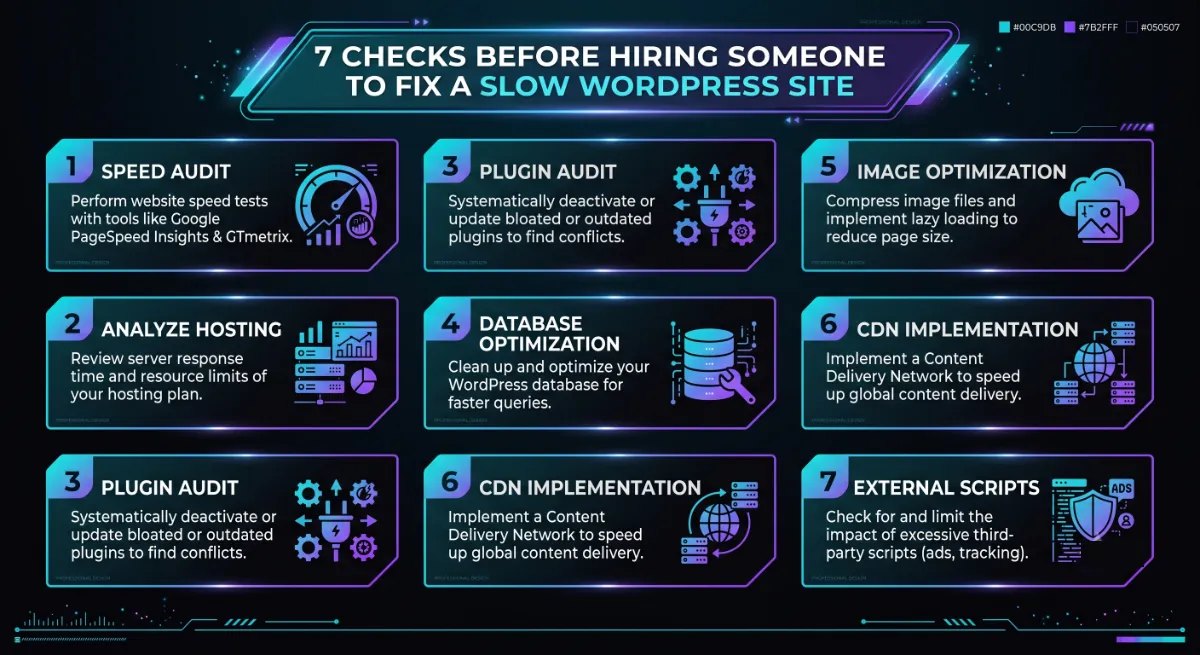
- Before-and-after proof. Ask for real PageSpeed or Core Web Vitals scores from sites they sped up. Numbers, not adjectives.
- They measure first. A good specialist diagnoses before quoting. Anyone promising a result without seeing your site is guessing.
- They talk in Core Web Vitals. LCP, INP, and CLS should come up naturally. Vague talk of making it “faster” is a warning.
- Mobile focus. Most traffic and most speed failures are on mobile, so confirm they test and fix there first.
- Root-cause approach. They should name the actual bottleneck, not just reach for another caching plugin.
- A clear scope and fixed price. Speed work should be defined and priced, not open-ended hourly guessing.
- An honest fix-or-rebuild opinion. They should tell you when a fix will not be enough, even if it costs them the smaller job.
These slow WordPress site checks work because speed leaves evidence. A real specialist can show you a graph of a site going from red to green. Someone who cannot is asking you to take performance on faith, which is exactly what you cannot afford to do.
Pro tip: The single best question is, “Can you show me a before-and-after PageSpeed score from a site you fixed?” A specialist has these ready. A generalist usually does not.
With the right person identified, the natural worry is what all this will cost.
What It Costs to Fix a Slow WordPress Site
Fixing a slow WordPress site typically costs a few hundred to a couple of thousand dollars for a focused optimisation, depending on how deep the problems run. That is far less than a full rebuild, which is exactly why diagnosing the real cause first matters so much.
Pricing tracks the depth of the work. Here is roughly what to expect:
- Basic optimisation: a few hundred dollars. Caching, image compression, and cleanup for a simple, mostly sound site.
- Comprehensive optimisation: around $1,000–$2,500. Deeper work across hosting, database, render path, and theme tuning.
- Rebuild instead: from $3,000 up, when the site is too bloated to fix economically and a lean rebuild is the better value.
The key with a slow WordPress site is not to overpay for a rebuild when a fix would do, or to keep paying for band-aid fixes when the structure needs replacing. A specialist who diagnoses first saves you from both mistakes. You can see transparent numbers for this kind of work on our pricing page, and ongoing maintenance and support keeps a site fast after it has been fixed, so it does not slowly slide back.
Before you commit, it helps to recognise the warning signs of someone who cannot actually deliver speed.
Red Flags When Hiring for Speed
The clearest red flag when hiring to fix a slow WordPress site is anyone who promises a fast result without first measuring your site or naming a specific cause. Speed is measurable, so vagueness is a genuine warning sign.
Watch for these specific signals:
- They quote before diagnosing. A real fix starts with measurement. A price without a look is a guess.
- They cannot show before-and-after scores. If they have sped up sites, they have the graphs. No graphs, no proof.
- Their answer is always “a plugin.” Reaching for another plugin instead of finding the root cause is how sites get slower.
- They ignore mobile. Mobile is where speed is judged, so a desktop-only focus misses the real problem.
- They will not commit to a target. A confident specialist will name the Core Web Vitals they expect to hit.
Avoid those, insist on measurement, and fixing your slow site becomes a straightforward, provable project. Use the quick tool below to see what your site most likely needs.
Want to know exactly why your site is slow?
Send us your URL. We will measure it, name the real bottleneck, and quote an honest fix, no obligation. Get a speed diagnosis.
Frequently Asked Questions
Who should I hire to fix my slow WordPress site?
Hire a WordPress performance specialist rather than a general developer or your host’s support line. Speed optimisation is a distinct discipline measured in Core Web Vitals, and a specialist diagnoses the real bottleneck and proves the result with before-and-after scores. Ask any candidate to show a real PageSpeed improvement from a site they fixed.
Why is my WordPress site so slow?
Usually because of cheap shared hosting, page-builder bloat, unoptimised images, too many plugins, or missing caching, often several at once. WordPress itself is efficient; the slowness comes from what is layered on top. Start with a PageSpeed Insights baseline, then address the biggest cause first.
Can I fix a slow WordPress site myself?
Sometimes. If there is one obvious cause, you run under twenty plugins, your site is simple, and you are comfortable editing WordPress, then compressing images, adding caching, and improving hosting can help a lot. If the problem is deeper, in the backend or database, a specialist will fix it faster and more safely.
How much does it cost to fix a slow WordPress site?
A focused optimisation usually costs a few hundred dollars for a simple site, and around $1,000 to $2,500 for deeper work across hosting, database, and theme. A full rebuild starts higher, from about $3,000. Diagnosing the cause first ensures you pay for the right level of work rather than overspending.
Should I fix my slow site or rebuild it?
Fix it when the foundations are sound and the issues are hosting, images, caching, or a few plugins. Rebuild it when the slowness is baked into a bloated page-builder theme or tangled code that costs more to untangle than to replace. A good specialist will quote both and tell you honestly which is the better value.
How fast should my WordPress site be in 2026?
Aim to pass Google’s Core Web Vitals: Largest Contentful Paint under 2.5 seconds, Interaction to Next Paint under 200 milliseconds, and Cumulative Layout Shift under 0.1, with a mobile PageSpeed score of 80 or above. These are measured on real visitors, so mobile performance matters most.
Will a caching plugin fix my slow WordPress site?
Sometimes partly, but rarely completely. Caching helps, but most slow sites have several bottlenecks stacked together, so one plugin fixes only one link in the chain. If caching alone does not solve it, the real cause is likely your hosting, images, or plugin load, which needs proper diagnosis.
Conclusion
When you are deciding who to hire to fix a slow WordPress site, the answer is a performance specialist who measures before they promise, names the real cause, and proves the result with before-and-after numbers. Start by understanding the likely culprit, then decide honestly whether it is a DIY tune-up or a specialist job.
Insist on a fix-or-rebuild opinion you can trust. Do that, and speed stops being a mystery and becomes a solved, measurable problem, with a faster site and the rankings and conversions that come with it. Get a baseline score today, and you will already know more than most people who hire blind.
Ready to make your slow site fast?
Send us your URL for an honest speed diagnosis and a fixed quote to fix it, or a straight answer if a rebuild would serve you better. Start the conversation.
This article was last reviewed and updated in {{UPDATED}} to reflect current 2026 Core Web Vitals thresholds and WordPress performance best practices.